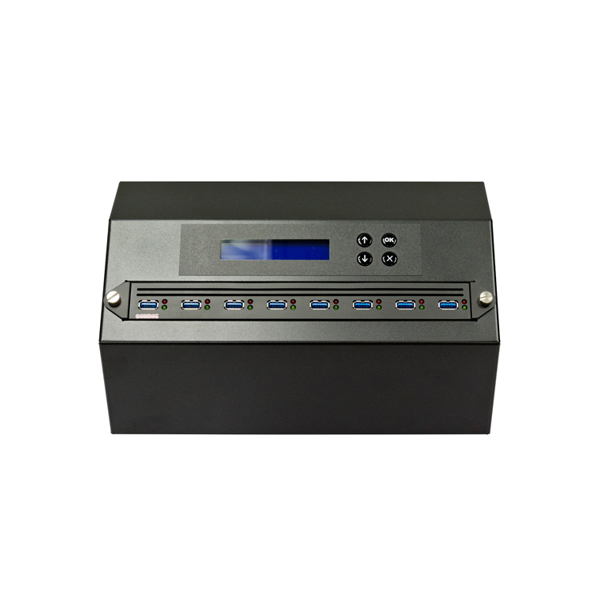


ADR’s new USB 3.1 duplicators are the first devices on the market to offer true USB 3.1 speeds. The device is not only compatible with USB 3.1 storage devices, but is specifically designed for USB 3.1 media.
No other system offers the same speed and performance as the USB 3.1 Producer PRO.
With this USB 3.1 duplicator, you get one of the fastest devices available for your production line.
Just like all ADR flash duplicators, it’s easy to use. Simply insert your USB flash drive and the empty destination drives into the USB 3.1 duplicator and press the copy button.
The USB 3.1 duplicator copies all data bit by bit without any problems. When the copy is complete, the test results appear on the display. In addition, the red and green LED indicators next to each port provide clear information about the results.
USB 3.1 Producer PRO also offers comprehensive quality tests for your USB media, so you can verify just how fast and reliable your USB devices actually are. The Media Check feature helps you ensure that your supplier provides high-quality media. This allows you to establish an internal quality control process.
The unit comes with an easy-to-use control panel that makes the work process as simple as possible. The LCD display always provides clear information about the current process and the results.
With this series of USB 3.1 splitters, maintenance costs can be kept very low. Thanks to Quick Socket Technology, you can replace the connectors yourself when they wear out. Simply turn off the power, pull out the defective port, and insert a new one. You don’t need to send the device to a service center, which means you avoid extra repair costs for routine maintenance.
The USB 3.1 duplication system is suitable for the mass production of USB flash drives.
External 2.5-inch USB hard drives can be copied using the USB Producer PRO series. Additional power adapters are available as an option to ensure an adequate power supply.
All products in the PRO series come with the Write Protect feature, which allows you to enable write protection on USB flash drives. To ensure that the write protection feature works properly, you must use ADR USB flash drives.
We offer high-quality USB flash drives to ensure the best possible results. Other USB flash drives are not supported for the Write Protect feature, as their quality cannot be guaranteed.
Simply use the ” Set Write Protect ” feature to create write-protected USB flash drives.
Insert the USB flash drive you want to copy into the master port and connect the target devices to the USB 3.1 duplicator.
Select the function you want to use and confirm by pressing the OK button. The entire process then runs automatically at high speed.
The speed may vary depending on the USB flash drives used and how many are connected to the system.
ADR USB Producer PRO does not require a computer and operates completely independently.
Process information is shown on the LCD display. In addition, the red and green LED indicators next to each port show the results.
You can choose from several different copy modes, such as:
All processes are carried out step by step to ensure a reliable result.
Contact us for a quote and delivery time.
| Specifications | Information |
|---|---|
| Supported Media | USB flash drives (other flash drive formats can be used with an adapter) |
| Number of gates | 1 master + 7, 15, 23, 31, 39, or 47 target ports |
| Data Transfer Rate | Up to 10 GB per minute (depending on the media) |
| Copy Mode | Standalone – synchronous or asynchronous |
| LED Indicators | Green/red LED on each port |
| Controls | 4 buttons (Forward, Back, OK, Esc) |
| Power Supply | 110 V~ or 230 V~, internal power supply |
| Operating Temperature | 0 °C–75 °C |
| Certifications | FCC, CE, UL, RoHS |
At the same time, I have corrected obvious spelling errors and made the phrasing sound more natural in Swedish, without changing the technical meaning.